Configuration Overview
Configuration
Section titled “Configuration”BARAS stores its configuration in a TOML file that is automatically managed by the application. All settings are accessible from the Settings tab in the main window.
Config location: ~/.config/baras/config.toml
Log Directory
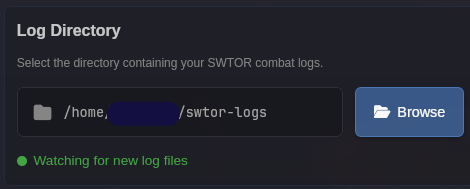
Section titled “Log Directory”The log directory tells BARAS where to find your SWTOR combat logs.
| Platform | Default Path |
|---|---|
| Windows | Documents\Star Wars - The Old Republic\CombatLogs |
| Linux | ~/.local/share/Steam/steamapps/compatdata/1286830/pfx/drive_c/users/steamuser/Documents/Star Wars - The Old Republic/CombatLogs |
| macOS | Must be set manually |
Click Browse in the Settings tab to change the log directory. BARAS watches this directory for new combat log files and begins parsing automatically.
Overlay Settings
Section titled “Overlay Settings”Global settings that affect all overlays:
| Setting | Description |
|---|---|
| Opacity | Global background transparency for metric overlays (0-255) |
| Scaling Factor | UI scale multiplier for metric overlays |
| Show Empty Bars | Display bars for players with zero values |
| Stack from Bottom | Grow metric bars upward instead of downward |
| Class Icons | Show class icons next to player names |
| Hide During Conversations | Automatically hide overlays during cutscenes |
Each overlay type also has its own appearance settings. See the Overlays page for per-overlay customization options.
Positioning Overlays
Section titled “Positioning Overlays”Enter Move Mode to reposition and resize overlays:
- Click the Unlock button in the Overlays tab (or use your hotkey)
- Drag overlays to reposition them
- Use the bottom-right handle to resize
- Click Lock to save positions and return to normal mode
Parsely Integration
Section titled “Parsely Integration”BARAS can upload encounter data to Parsely for sharing and comparison.
| Setting | Description |
|---|---|
| Username | Your Parsely username for uploads |
| Guild | Optional guild tag to include with uploads |
Application Settings
Section titled “Application Settings”| Setting | Description |
|---|---|
| Minimize to Tray | Keep BARAS running in the system tray when the window is closed |
Configuration File
Section titled “Configuration File”The configuration file is located at ~/.config/baras/config.toml and is human-readable TOML. While most settings should be changed through the UI, advanced users can edit it directly.