Overlays
Overlays
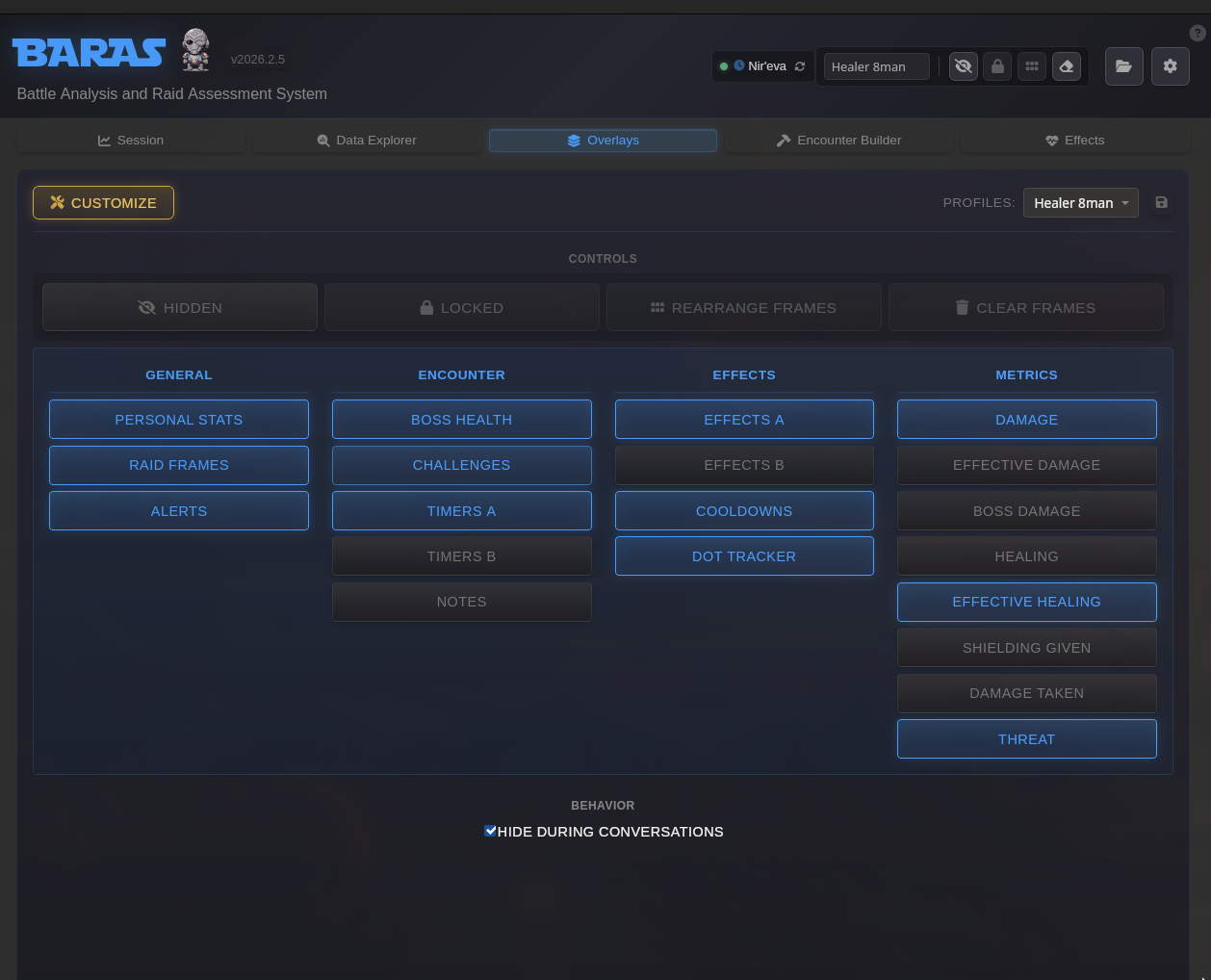
Section titled “Overlays”BARAS provides 18 customizable overlays organized into three categories. Each overlay can be independently positioned, resized, and configured.
Global Controls
Section titled “Global Controls”These settings apply to all overlays and can be accessed from the Overlays tab.
| Setting | Description |
|---|---|
| Enabled | Toggle whether the overlay is active. Click the overlay button in the Overlays tab to enable/disable. |
| Visibility | Toggle between visible and hidden states. Hidden overlays remain configured but aren’t displayed. |
| Lock State | When locked, overlays cannot be moved or resized. Toggle to Move Mode to reposition. |
| Profiles | Save and load overlay configurations. Useful for different setups (e.g., tanking vs DPS layouts). |
Positioning & Sizing
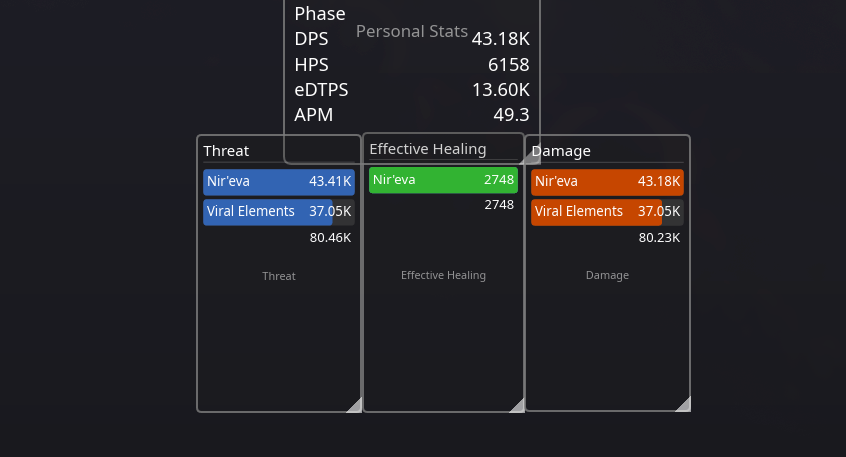
Section titled “Positioning & Sizing”Enter Move Mode from the Overlays tab to adjust overlay positions and sizes. In Move Mode:
- Overlays display with a semi-transparent background and grey border
- Drag the overlay to reposition it on screen
- Resize using the handle in the bottom-right corner
- Positions are automatically saved when exiting Move Mode
General Overlays
Section titled “General Overlays”Personal Stats
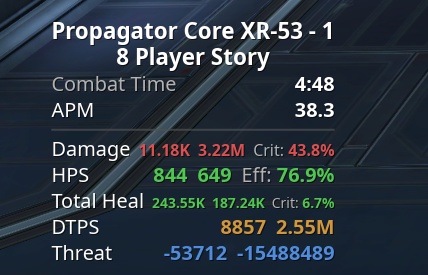
Section titled “Personal Stats”Displays your personal combat statistics in real-time, including DPS, HPS, threat, and other performance metrics. Useful for monitoring your own output during encounters.
Customization Options:
You can pick and choose the elements to display on the personal overlay as well as the order in which they appear. Additionally, separator lines can be placed between elements.
| Element | Description |
|---|---|
| Encounter Name | The name of the encounter and the pull count. |
| Difficulty | The area’s difficulty |
| Duration | The current duration of combat |
| Phase | The name of the current phase of a boss fight, if any. |
| APM | Your Actions Per Minute |
| Damage | DPS, Total Damage, Crit % |
| Healing | HPS, EHPS, Eff Heal % |
| Heal+ | Total Healing, Total Effective Healing, Heal Crit % |
| DTPS | DTPS, Total Damage Taken |
| Threat | TPS, Total thread |
| Boss DMG | Boss DPS, Total Boss Damage |
| Defense | Defense %, Shielding % |
- Font Color - Color for values, does not affect numeric values if Auto-color values is enabled
- Label Color - General font color of label text
- Auto-color Values - automatically assign canonical colors to metrics values (i.e. heals are green, DPS is red)
- Hide Empty Values - Automatically hide entries if the value is 0/blank
- Opacity - Background transparency
- Line Spacing - controls white space between elements
Raid Frames
Section titled “Raid Frames”Shows health bars and status information for your group or raid members. Helps healers and tanks track party health at a glance.
Customization Options:
- Grid Columns - Number of columns in the grid layout
- Grid Rows - Number of rows in the grid layout (total slots must be 4, 8, or 16)
- Max Effects Per Frame - Maximum tracked effects shown per player
- Effect Size - Size of effect indicators in pixels
- Effect Vertical Offset - Vertical spacing for effect indicators
- Frame Background Color - Background color for each player frame
- Show Role Icons - Display tank/healer/DPS role icons
- Effect Fill Opacity - Opacity of effect indicator fills
- Show Effect Icons - Display icons for tracked effects
- Opacity - Background transparency
Alerts
Section titled “Alerts”Shows triggered alert notifications from effects and encounter timers. Alerts appear when configured conditions are met, such as an effect expiring or a timer reaching zero.
Customization Options:
- Font Size - Size of alert text
- Max Display - Maximum alerts to show at once
- Default Duration - Seconds to show each alert at full opacity
- Fade Duration - Seconds for fade-out effect after duration expires
- Opacity - Background transparency
Encounter Overlays
Section titled “Encounter Overlays”Boss Health
Section titled “Boss Health”Displays HP bars for encounter entities. Only entities with Show on HP Overlay enabled in the Encounter Builder will appear on this overlay.
Customization Options:
- Bar Color - Color of the health bars
- Font Color - Color of the text
- Show Percent - Display HP percentage
- Show Target - Display target name
- Opacity - Background transparency
Encounter Timers
Section titled “Encounter Timers”Shows active timers and upcoming mechanics from the current encounter definition. Timers are configured in the Encounter Builder and display countdowns for boss abilities and phase transitions.
Customization Options:
- Default Bar Color - Default color for timer bars (individual timers can override)
- Font Color - Color for timer text
- Max Display - Maximum number of timers to show
- Sort by Remaining - Sort timers by remaining time (vs. activation order)
- Opacity - Background transparency
Challenges
Section titled “Challenges”Displays challenge metrics defined in the Encounter Builder. Challenges track specific performance goals during encounters, such as damage during a phase or ability usage counts.
Customization Options:
- Font Color - Color for challenge text
- Default Bar Color - Default color for challenge bars (individual challenges can override)
- Show Footer - Display footer with totals
- Show Duration - Display duration in header
- Max Display - Maximum challenges to show
- Layout - Vertical or Horizontal arrangement of challenge cards
- Opacity - Background transparency
Available Metrics:
- Damage, Healing, Effective Healing
- Damage Taken, Healing Taken
- Ability Count, Effect Count
- Deaths, Threat
Conditions (scope metrics to specific situations):
- Target, Source, Ability, Effect filters
- Phase restrictions
- Counter conditions
- Boss HP Range
Displays encounter-specific notes configured in the Encounter Builder. Useful for showing reminders or strategies during fights.
Customization Options:
- Font Size - Size of notes text
- Font Color - Color of notes text
- Opacity - Background transparency
Effects
Section titled “Effects”Effects overlays display tracked abilities, buffs, debuffs, and cooldowns. Each effect is configured in the Effects Tracker where you assign it to a specific display target.
Effects A
Section titled “Effects A”Primary effects overlay, typically used for tracking personal buffs and procs.
Customization Options:
- Icon Size - Size of effect icons in pixels
- Max Display - Maximum effects to show
- Layout Vertical - Use vertical layout (true) or horizontal (false)
- Show Effect Names - Display effect names below/beside icons
- Show Countdown - Display countdown text on icons
- Stack Priority - When enabled, stacks are shown large and centered; timer is secondary
- Show Header - Display header title above overlay
- Opacity - Background transparency
Effects B
Section titled “Effects B”Functions exactly the same as Effects A. Allows separation of effect types for cleaner displays.
Cooldowns
Section titled “Cooldowns”Tracks ability cooldowns with visual timers. Assign abilities to this target in the Effects Tracker to monitor when key abilities become available.
Customization Options:
- Icon Size - Size of cooldown icons in pixels
- Max Display - Maximum cooldowns to show
- Show Ability Names - Display ability names
- Sort by Remaining - Sort by remaining time
- Show Source Name - Display who used the ability
- Show Target Name - Display target of ability (for targeted CDs like taunts)
- Show Header - Display header title above overlay
- Opacity - Background transparency
DOT Tracker
Section titled “DOT Tracker”Multi-target DOT tracking overlay that shows effect timers per target. Displays the remaining duration of your damage-over-time effects on each affected enemy, helping maintain uptime across multiple targets.
Customization Options:
- Max Targets - Maximum targets to track simultaneously
- Icon Size - Size of DOT icons in pixels
- Prune Delay - Seconds to keep a target after last DOT expires
- Font Color - Color for target names
- Show Effect Names - Display DOT names alongside icons
- Show Source Name - Display who applied the DOT
- Show Header - Display header title above overlay
- Show Countdown - Display countdown timers on icons
- Opacity - Background transparency
Metrics
Section titled “Metrics”Metrics overlays display combat performance data for all players in your group. Each overlay focuses on a specific metric type.
All metrics overlays share the same customization options:
Common Customization Options:
- Show Per-Second - Display per-second rate (e.g., DPS, HPS)
- Show Total - Display total values
- Show Header - Display overlay header
- Show Footer - Display overlay footer
- Show Class Icons - Display class icons next to player names
- Show Percent - Display percentage of total
- Show Duration - Display encounter duration
- Max Entries - Maximum players to display
- Bar Color - Color of the meter bars
- Font Color - Color of the text
- Opacity - Background transparency
Global Metrics Settings:
- Show Empty Bars - Display bars for players with zero values
- Stack from Bottom - Grow bars from bottom instead of top
- Scaling Factor - UI scale multiplier
Damage
Section titled “Damage”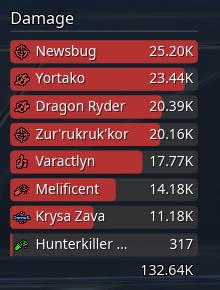
Total damage dealt by each player. Includes all damage output regardless of whether it was absorbed or mitigated by the target.
Effective Damage
Section titled “Effective Damage”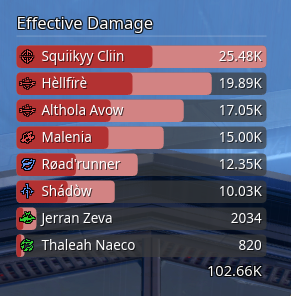
Visually splits damage into damage done to bosses (darker shade) and total boss plus add damage (lighter shade). EDPS will also exclude damage that is greater than the NPC’s remaining health pool when a killing blow is struck.
Boss Damage
Section titled “Boss Damage”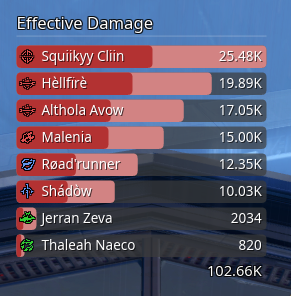
Damage dealt specifically to entities marked as Is Boss in the Encounter Builder.
Healing
Section titled “Healing”Total healing output by each player.
Effective Healing
Section titled “Effective Healing”Healing that actually restored health. Excludes overhealing, showing only healing that filled missing health bars.
Shielding Given
Section titled “Shielding Given”Shield and barrier absorption provided to allies.
Damage Taken
Section titled “Damage Taken”Total damage received by each player.
Threat
Section titled “Threat”Threat generated by each player.
Behavior Options
Section titled “Behavior Options”| Option | Description |
|---|---|
| Hide During Conversations | Automatically hides overlays during cutscenes |