Importing & Exporting Custom Timers and Effects
Importing & Exporting Custom Timers and Effects
Section titled “Importing & Exporting Custom Timers and Effects”BARAS supports importing and exporting encounter definitions as TOML files. For migrating from StarParse, see Switching from StarParse.
Exporting Encounter Definitions
Section titled “Exporting Encounter Definitions”Export encounter definitions to share with other BARAS users or to back up your customizations.
- Open the Encounter Builder tab
- Select the area you want to export
- Click Export Area to save the entire area as a
.tomlfile
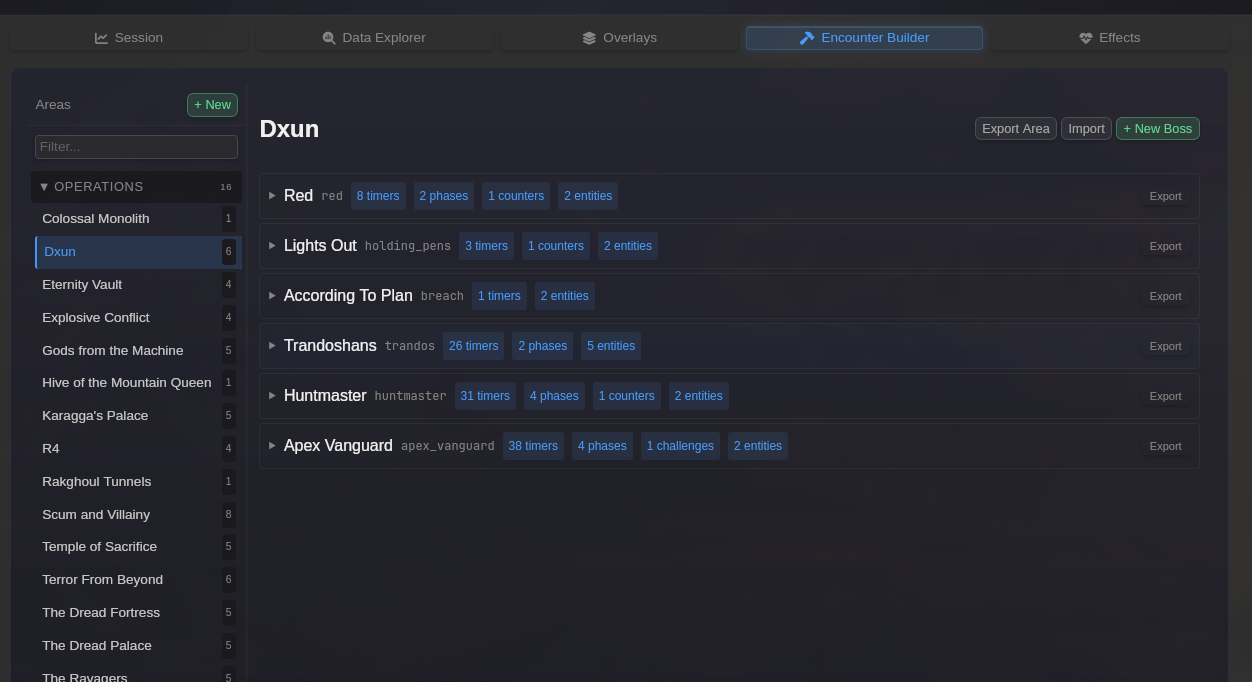
What gets exported:
- All boss encounter definitions in the area
- Timers, phases, counters, and challenges
- Entity definitions
- Raid challenge configurations
Importing Encounter Definitions
Section titled “Importing Encounter Definitions”Import encounter definitions from .toml files shared by other users or exported from another BARAS installation.
- Open the Encounter Builder tab
- Select a target area (or leave unselected for new areas)
- Click Import
- Select a
.tomlfile from the file picker - Review the import preview before confirming
Import Preview
Section titled “Import Preview”Before applying changes, BARAS shows a detailed preview of what will happen:
The preview shows for each boss:
- New bosses — Bosses that don’t exist in the target area (marked with a “new” tag)
- Items to replace — Existing timers, phases, or counters that will be overwritten
- Items to add — New items that will be added alongside existing ones
- Items unchanged — Items that already match and won’t be modified
Items are grouped by type (timers, phases, counters, challenges, entities) for easy review.
Click Import to apply the changes, or Cancel to discard.