Encounter Timers
Encounter Timers
Section titled “Encounter Timers”Encounter timers track boss abilities, mechanics, and phase transitions. They display countdowns on the timer overlay and can trigger alerts and audio cues.
Timers are configured in the Encounter Builder under the Timers section for each boss encounter.
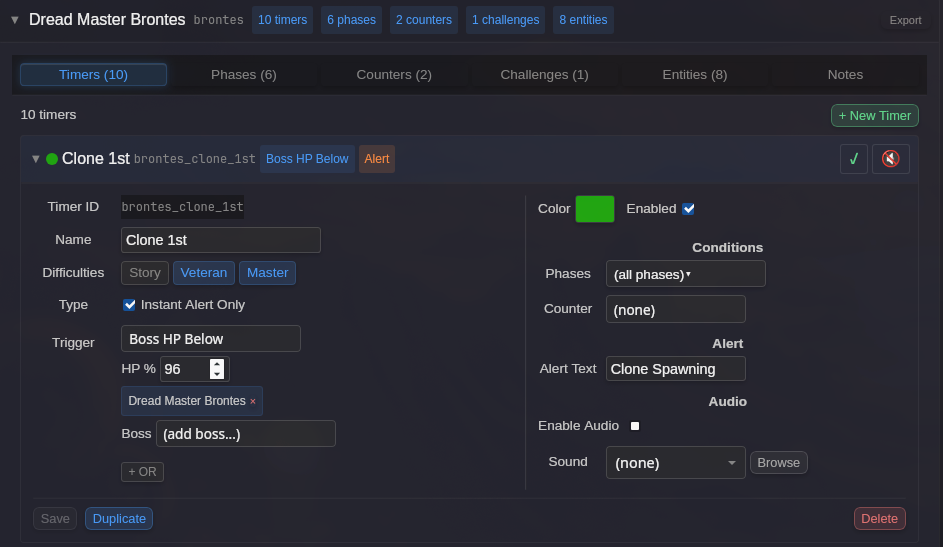
Timer Fields
Section titled “Timer Fields”Identity
Section titled “Identity”| Field | Description |
|---|---|
| Timer ID | Unique identifier for the timer (auto-generated from name if not set) |
| Name | Internal name for the timer definition |
| Display Text | Text shown on the overlay (defaults to Name if not set) |
Timing
Section titled “Timing”| Field | Description |
|---|---|
| Duration | Timer duration in seconds. Set to 0 for instant alerts. |
Trigger
Section titled “Trigger”The trigger determines what event causes the timer to start. See Triggers & Filters for the full list of available triggers.
Common timer triggers include:
| Trigger | Use Case |
|---|---|
| Combat Start | Abilities that happen at pull (e.g., first cast) |
| Ability Cast | Track when a boss uses a specific ability |
| Effect Applied | Track debuffs applied to players |
| Effect Removed | Track when a buff/debuff falls off |
| Boss HP Below | Phase transitions at HP thresholds |
| Timer Expires | Chain timers together (one triggers the next) |
| Phase Entered | Timers that only start in specific phases |
Options
Section titled “Options”| Option | Description |
|---|---|
| Can Refresh | If enabled, re-triggering resets the duration instead of creating a new timer instance |
| Repeats | Number of times the timer repeats after the initial trigger (0 = no repeat) |
Chaining
Section titled “Chaining”| Field | Description |
|---|---|
| Chains To | Timer ID to start when this timer expires (for sequential mechanics) |
| Cancel On | Trigger that cancels this timer early (defaults to combat end). Click ”+ Add Cancel Trigger” to configure. |
Display Options
Section titled “Display Options”
| Option | Description |
|---|---|
| Color | Bar color for this timer (click to open color picker) |
| Enabled | Toggle whether this timer is active |
| Show at | Only display when this many seconds remain (0 = always show). Useful for long cooldown timers. |
| Display Target | Which overlay shows this timer: Timers A, Timers B, or None (alerts only) |
Conditions
Section titled “Conditions”Conditions restrict when a timer can activate.
| Condition | Description |
|---|---|
| Difficulties | Only active on specific difficulties (Story, Veteran, Master) |
| Phases | Only active during specific phases (empty = all phases) |
| Counter | Only active when a counter meets a specific condition |
Audio settings control sounds and voice alerts for the timer.
| Option | Description |
|---|---|
| Enable Audio | Master toggle for audio on this timer |
| Sound | Audio file to play (select from dropdown or browse for custom file) |
| Audio Offset | When to play the sound: “On expiration” or seconds before expiration |
| Voice | Enable voice countdown (Off or select voice pack like “Amy”) |
Countdown Voice
Section titled “Countdown Voice”When Voice is enabled, BARAS will speak the countdown (e.g., “3… 2… 1…”) starting from the Audio Offset value.
Instant Alerts
Section titled “Instant Alerts”For mechanics that don’t have a countdown (instant notifications), check Instant Alert Only under Type. This:
- Sets duration to 0
- Displays the timer as a text alert instead of a countdown bar
- Useful for “X happened” notifications rather than “X will happen in N seconds”
Examples
Section titled “Examples”Basic Ability Timer
Section titled “Basic Ability Timer”Track a boss ability with a 30-second cooldown:
| Field | Value |
|---|---|
| Name | Smash |
| Trigger | Ability Cast |
| Abilities | Smash |
| Duration | 30 sec |
HP Phase Transition
Section titled “HP Phase Transition”Alert when boss reaches 50% HP:
| Field | Value |
|---|---|
| Name | Phase 2 |
| Trigger | Boss HP Below |
| HP Percent | 50 |
| Duration | 0 sec |
| Type | Instant Alert |
Chained Timers
Section titled “Chained Timers”For mechanics that repeat in sequence (A happens, then B 10s later, then C 15s after that):
Timer A:
| Field | Value |
|---|---|
| Name | Mechanic A |
| Trigger | Combat Start |
| Duration | 10 sec |
| Chains To | mechanic_b |
Timer B:
| Field | Value |
|---|---|
| Name | Mechanic B |
| Timer ID | mechanic_b |
| Trigger | Timer Expires |
| Timer | mechanic_a |
| Duration | 15 sec |
| Chains To | mechanic_c |
Timer List
Section titled “Timer List”
The timer list shows all timers for the current encounter. Each row displays:
- Color indicator - Timer bar color
- Name - Timer display name
- ID - Timer ID (shown in smaller text)
- Trigger type - Badge showing trigger type (Combat Start, Ability Cast, etc.)
- Duration - Timer duration in seconds
- Enable toggle - Quick enable/disable
- Audio toggle - Quick audio enable/disable
Click a timer row to expand and edit its settings.