Effects Tracker
Effects Tracker
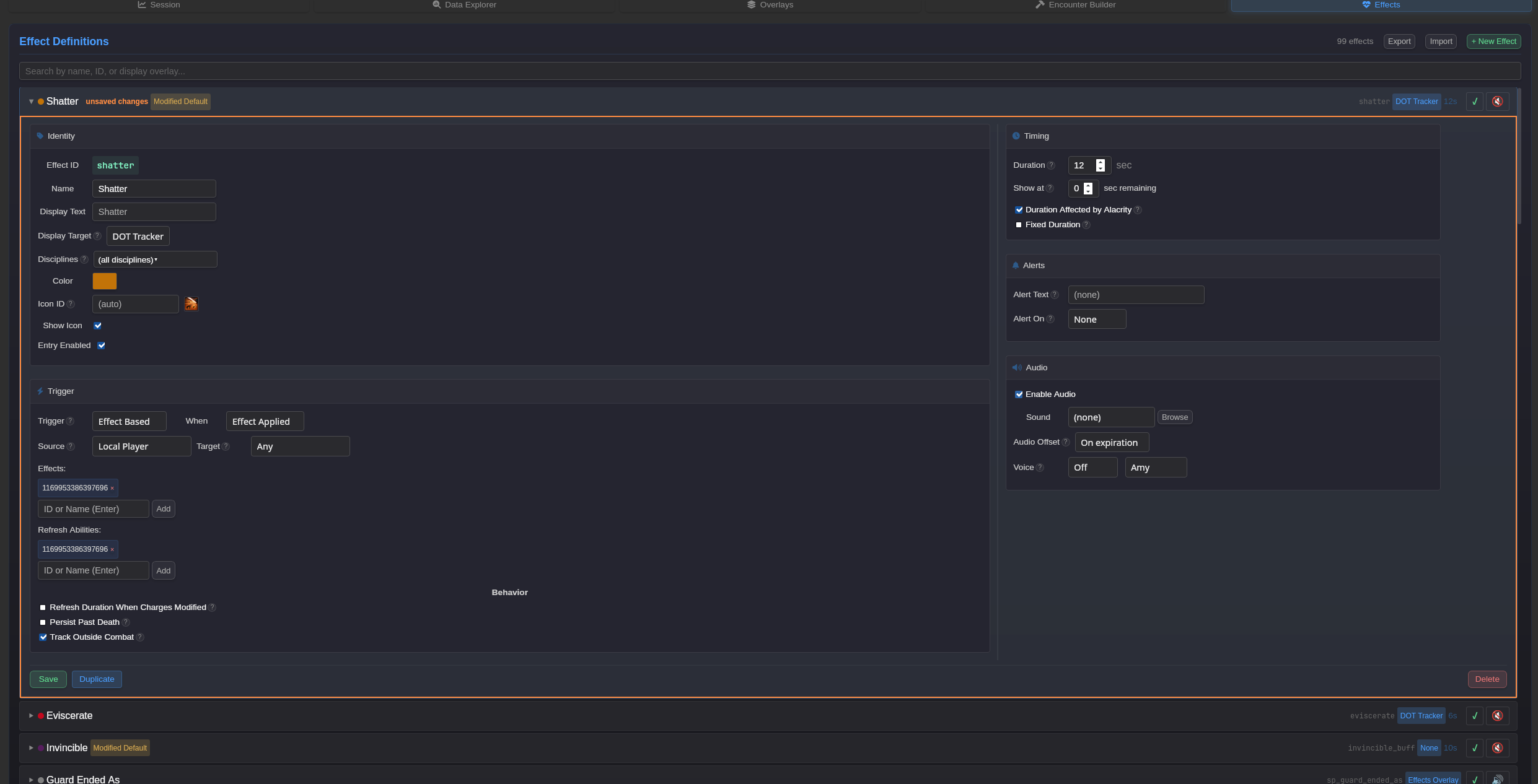
Section titled “Effects Tracker”The Effects Tracker allows you to define custom effect definitions that track abilities, buffs, debuffs, and cooldowns. Each effect can be displayed on one of several overlay targets.
Access the Effects Tracker from the Effects tab in the main application.
Effect Fields
Section titled “Effect Fields”Identity
Section titled “Identity”| Field | Description |
|---|---|
| Effect ID | Unique identifier for the effect definition (auto-generated from name if not set) |
| Name | Internal name for the effect definition |
| Display Text | Text shown on the overlay (defaults to Name if not set) |
| Display Target | Which overlay displays this effect (see Display Targets below) |
Display Targets
Section titled “Display Targets”| Target | Description |
|---|---|
| Effects A | Primary effects overlay (typically personal buffs) |
| Effects B | Secondary effects overlay (typically personal debuffs) |
| Cooldowns | Ability cooldown tracker |
| DOT Tracker | Multi-target DOT tracking overlay |
| Raid Frames | Display on raid frames (for HOTs on group members) |
Trigger
Section titled “Trigger”The trigger determines what game event causes the effect to start tracking.
| Field | Description |
|---|---|
| Trigger | Trigger type: Effect Based or Ability Based |
| When | For Effect Based: Effect Applied or Effect Removed |
| Source | Entity filter for who triggers the effect |
| Target | Entity filter for who receives the effect |
| Effects / Abilities | List of effect or ability IDs/names that activate tracking |
| Refresh Abilities | Abilities that refresh the duration without restarting |
Trigger Types
Section titled “Trigger Types”| Type | Use Case |
|---|---|
| Effect Applied | Track when a buff/debuff is applied (most common for buffs) |
| Effect Removed | Track when a buff/debuff is removed |
| Ability Cast | Track when an ability is used (common for cooldowns and procs) |
Entity Filters
Section titled “Entity Filters”See Triggers & Filters for the full list of available source and target filters.
Common filters:
- Local Player - Only match the local player
- Any Player - Match any player in the group
- Any - Match any entity (default)
Timing
Section titled “Timing”| Field | Description |
|---|---|
| Duration | How long the effect lasts in seconds (leave empty for indefinite) |
| Show at | Only display when this many seconds remain (0 = always show) |
Display Options
Section titled “Display Options”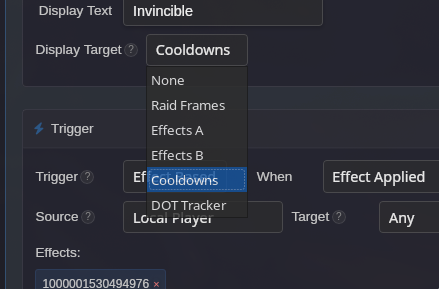
| Option | Description |
|---|---|
| Color | Bar/icon highlight color for the effect (click to open color picker) |
| Enabled | Toggle whether this effect definition is active |
| Icon ID | Custom ability ID for the icon (auto-detected from trigger by default) |
| Show Icon | Display the ability icon (disable to show colored square instead) |
| Duration Affected by Alacrity | Adjust duration based on player’s alacrity stat |
Advanced Options
Section titled “Advanced Options”| Option | Description |
|---|---|
| Fixed Duration | Ignore game “effect removed” signals - only expire via duration timer. Useful for tracking cooldowns that shouldn’t end when a buff is consumed. |
| Refresh Duration When Charges Modified | Reset the timer when ability charges change |
| Persist Past Death | Continue tracking after the target dies |
| Track Outside Combat | Track this effect even when not in combat |
Alerts
Section titled “Alerts”| Option | Description |
|---|---|
| Alert Text | Custom text to display in the alerts overlay |
| Alert On | When to trigger the alert: None, On Apply, or On Expire |
| Enable Audio | Play sound when the alert triggers |
Alert Timing
Section titled “Alert Timing”| Setting | Behavior |
|---|---|
| None | No alert is displayed |
| On Apply | Alert appears when the effect starts |
| On Expire | Alert appears when the effect ends or timer runs out |
Examples
Section titled “Examples”Personal Buff Tracker
Section titled “Personal Buff Tracker”Track a personal buff like Kolto Probe:
| Field | Value |
|---|---|
| Name | Kolto Probe |
| Display Target | Raid Frames |
| Trigger | Effect Based |
| When | Effect Applied |
| Source | Local Player |
| Target | Any Player |
| Effects | (Kolto Probe effect ID) |
| Duration | 21 sec |
Ability Cooldown
Section titled “Ability Cooldown”Track a cooldown like Force Shroud:
| Field | Value |
|---|---|
| Name | Force Shroud |
| Display Target | Cooldowns |
| Trigger | Ability Based |
| Source | Local Player |
| Abilities | Force Shroud |
| Duration | 60 sec |
| Fixed Duration | Enabled |
The Fixed Duration option ensures the cooldown timer runs for the full duration even if the buff is consumed early.
DOT Tracker
Section titled “DOT Tracker”Track a DOT on multiple enemies:
| Field | Value |
|---|---|
| Name | Burning |
| Display Target | DOT Tracker |
| Trigger | Effect Based |
| When | Effect Applied |
| Source | Local Player |
| Target | Any NPC |
| Effects | Burning |
| Duration | 18 sec |
Proc with Alert
Section titled “Proc with Alert”Track a proc and alert when it’s available:
| Field | Value |
|---|---|
| Name | Exploited |
| Display Target | Effects A |
| Trigger | Effect Based |
| When | Effect Applied |
| Source | Any |
| Target | Local Player |
| Effects | Exploited |
| Duration | 10 sec |
| Alert On | On Apply |
| Alert Text | Exploited! |
Effect List
Section titled “Effect List”
The effect list shows all defined effects. Each row displays:
- Color indicator - Effect color
- Name - Effect display name
- ID - Effect ID (shown in smaller text)
- Display Target - Badge showing which overlay displays this effect
- Duration - Effect duration in seconds
- Enable toggle - Quick enable/disable
- Audio toggle - Quick audio enable/disable
Click an effect row to expand and edit its settings.
Use the search box to filter effects by name, ID, or display target.