Log File Management
Log File Management
Section titled “Log File Management”SWTOR generates a new combat log file every time you enter a combat instance, which can quickly consume disk space. BARAS provides tools to manage these files from the Settings tab.
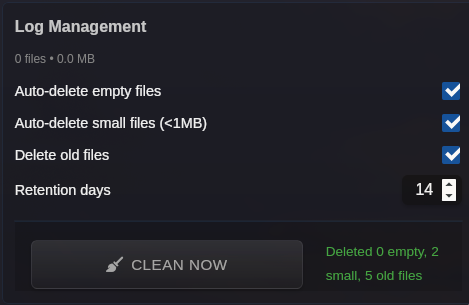
Directory Overview
Section titled “Directory Overview”The Settings tab shows a summary of your log directory:
- Total size — Combined size of all combat log files
- File count — Number of log files in the directory
Automatic Cleanup
Section titled “Automatic Cleanup”BARAS can automatically clean up log files on startup. Three independent cleanup modes are available — enable any combination:
Delete Empty Files
Section titled “Delete Empty Files”Removes files with 0 bytes. These are typically incomplete or corrupted logs created when SWTOR starts a combat instance but no events are recorded.
Delete Small Files (<1MB)
Section titled “Delete Small Files (<1MB)”Removes files smaller than 1 MB that are not from today. Small files usually represent very short combat sessions (a few seconds of trash combat). Files from the current day are preserved to avoid deleting an ongoing session.
Delete Old Files (Retention Policy)
Section titled “Delete Old Files (Retention Policy)”Removes files older than a specified number of days. Set the retention period using the number input:
- Minimum: 7 days
- Maximum: 365 days
- Default: 21 days
Manual Cleanup
Section titled “Manual Cleanup”Click the Clean Now button to run cleanup immediately using your current settings. The status message shows how many files were removed in each category:
Deleted 5 empty, 12 small, 3 old files
Display Filtering
Section titled “Display Filtering”| Setting | Description |
|---|---|
| Hide Small Files | Hide files under 1 MB from the log file list in the sidebar. These files are not deleted, just hidden from the UI for a cleaner view. |